FS25 Vehicle XML Previewer V1.0.0.0
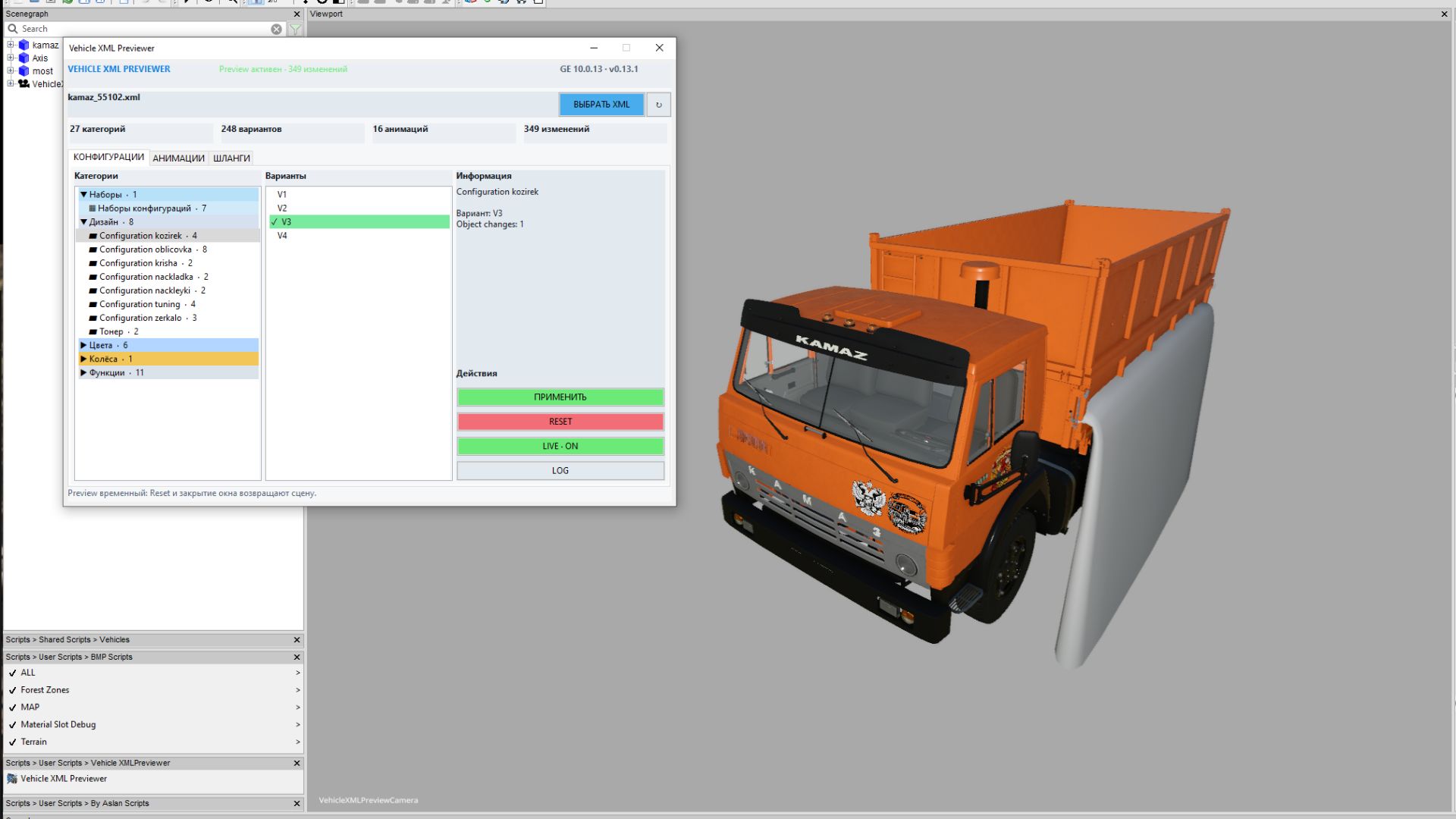

FS25 Vehicle XML Previewer V1.0.0.0
Vehicle XML Previewer for GIANTS Editor 10
Vehicle XML Previewer** is a handy script for Farming Simulator 25 modders that allows you to preview and configure vehicle XML settings directly within **GIANTS Editor**, without having to constantly launch the game.
The script automatically detects the XML file associated with the currently open I3D model, displays available configurations, animations, and hoses, and applies selected options immediately in the viewport. This significantly speeds up the process of configuring vehicles—including cabs, hoods, wheels, colors, doors, dynamically loaded parts, hoses, and other visual elements.
Script Features
– Automatically loads the XML file sharing the same name as the open I3D file.
– Displays all detected vehicle configuration categories.
– Allows for quick option switching with immediate visual feedback in GIANTS Editor.
– Supports `configurationSets` and automatic dependencies between configurations.
– Applies `objectChange` logic: hides unselected parts and displays selected ones.
– Supports color and material configurations defined in the XML.
– Loads external I3D parts via `dynamicallyLoadedParts`.
– Displays wheel configurations, external wheel XMLs, additional wheels, and tracks.
– Allows previewing XML-defined animations directly in the editor.
– Enables editing of animation parts and saving changes back to the XML.
– Supports previewing and editing `connectionHoses` and `localHose` elements.
– Allows creating, modifying, and saving hoses within the XML.
– Highlights selected hoses and connection points for easy identification in the scene.
– Can automatically set up a working camera and lighting for optimal model viewing.
– Features a compact, tabbed interface: **Configurations**, **Animations**, **Hoses**. Instead of the tedious “open game, check, close, edit XML” cycle, you can view most visual changes directly within the GIANTS Editor.
Installation (your folder paths may vary, but the installation method is standard: simply place the files in the `scripts` folder)
Extract the **VehicleXMLPreviewer** folder into the GIANTS Editor scripts directory:
“`text
C:/UsersUsername/AppData/Local/GIANTS Editor 64bit 10.0.13/scripts
“`
Once installed, the script will appear in the menu:
“`text
Scripts > User Scripts > VehicleXMLPreviewer > Vehicle XML Previewer
“`
How to use
1. Open the vehicle’s I3D file in GIANTS Editor.
2. Run the **Vehicle XML Previewer** script.
3. If an XML file with the same name exists alongside the I3D file, it will load automatically.
4. Select the desired configurations, animations, or hoses within the script’s tabs.
5. View the changes immediately in the viewport.
6. Save edited animations or hoses back to the XML file if necessary.
Important
It is recommended to back up your project before saving changes to the XML file. The script interacts with numerous game XML blocks; therefore, with complex mods featuring non-standard structures, there may be slight discrepancies compared to actual in-game behavior.
BMProd