FS25 Enhanced Vehicle v1.1.7.0

FS25 Enhanced Vehicle v1.1.7.0
V1.1.7.0
Bug fix for degree display no. 68
Translation added: br (thanks to TKPorreta)
V1.1.6.0
Bug fix for the configuration setting “showKeysInHelpMenu”
Key bindings and the help menu are no longer activated if a function (e.g., the parking brake) is disabled in the global settings
(Note: The vehicle must be re-entered to activate the change).
Translation added: uk (thanks to ilia235 on Discord)
This is a mod for Farming Simulator 25. It adds a route assistant (“GPS”), a heading adjustment function, a parking brake, differential locks, all-wheel drive modes, and improved hydraulic control to your vehicle. It also displays more vehicle details on the HUD, including the odometer and trip meter.
Known bugs
Probably many… please report.
Standard keyboard shortcuts
Key action
R Ctrl+Num / opens the configuration dialog for adjusting various settings
Num Enter Apply/release the parking brake
R Ctrl+End Align to current direction of travel or current track
R Ctrl+Home Reverse (= turn around)
R Shift+Home Change operating mode (align to direction of travel or track)
Hold for one second to deactivate the alignment assistant
R Ctrl+Num 1 Recalculate working width (e.g., spray width changed)
R Ctrl+Num 2 Recalculate track path (e.g., direction or working width changed)
R Ctrl+Num 3 Switch between the different line display modes
R Ctrl+Num * Switch between the different headland modes
R Shift+Num / / Num * Switch between headland distances
R Ctrl+Num 4 / Num 6 Decrease/increase the number of turning tracks
R Shift+Num 4 / Num 6 Move track left/right
R Ctrl+R Shift+Num Lock – / Num Lock + Move track offset line left/right
R Alt+Num Lock – / Num Lock + Decrease/increase track width
R Ctrl+Ins/Del Move vehicle one track to the right/left without turning
R Ctrl+Page Up/Page Down: Increase/decrease track width by 1°
R Shift+Page Up/Page Down: Increase/decrease track width by 90°
R Ctrl+R Shift+Page Up/Page Down: Increase/decrease track width by 45°
R Ctrl+Num Lock 5: Toggle between total odometer and trip odometer.
Hold to reset the trip odometer to 0.
R Ctrl+Num Lock 7: Activate/deactivate front axle differential lock.
R Ctrl+Num Lock 8: Activate/deactivate rear axle differential lock.
R Ctrl+Num 9: Toggle the wheel drive mode between 4WD (all-wheel drive) and 2WD (two-wheel drive).
L Alt+1: Rear attachments up/down.
L Alt+2: Rear attachments on/off.
L Alt+3: Front attachments up/down.
L Alt+4: Front attachments on/off.
Function of this mod:
At the start of the game, all motorized and controllable vehicles on the map are reset to the default settings: wheel drive mode to “All-wheel drive (4WD)” and both differentials are deactivated.
Press Ctrl+Num / to open the configuration dialog.
Press R Shift+Home to activate the direction or lane departure warning system.
Hold R Shift+Home for one second or longer to completely deactivate the lane departure warning system.
Press R Ctrl+End to keep your vehicle in the current direction or on the current track.
Press R Ctrl+Home to reverse the guidance (e.g., to turn around at the end of a field).
Press R Ctrl+Numpad 2 to calculate guidance based on the current vehicle direction and working width.
When you activate guidance mode, the vehicle travels in the currently marked track.
Press R Ctrl+Numpad 4/6 to adjust the turning track number (from -5 to 5).
Configure headland behavior in the configuration menu or using the buttons.
Press R Ctrl+Numpad 1 to (re)calculate the working width. This does not change the current guidance.
Press Numpad Enter to put your vehicle into Park mode. It will not move an inch in this mode.
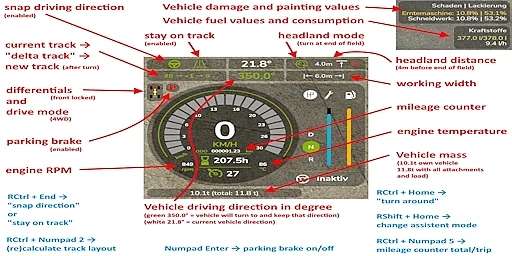
The HUD displays the following:
(When lane guidance is enabled) The current lane guidance angle, as well as the current lane and turn number.
Damage values in % for the controlled vehicle and all its attachments.
Fuel tank level for diesel/AdBlue/electric/methane and current fuel consumption1.
Total vehicle mileage or current trip mileage.
Current status of the differential locks and all-wheel drive.
Current engine speed and temperature1.
Current vehicle mass and total mass of the vehicle including all attachments and loads.
Key bindings can be changed in the game options.
1 In multiplayer games, all clients except the host do not display fuel consumption and engine temperature correctly due to limitations of the GIANTS Engine.
ZhooL